Who this guide is for: Salesforce admins and programme or fundraising coordinators who have heard of Agentforce, are not sure what it is, and want to know whether it would help with the day-to-day checking across event, email and file tools.
- You'll need: Salesforce with the required Agentforce employee-agent entitlement, the relevant Beaufort 12 base integrations and Agentforce add-ons installed and connected, and a Salesforce admin who can configure actions and user access. Check each product guide for supported versions and add-on availability.
- Time: 8-10 minutes to read
- At the end: You will understand what a custom Agentforce agent is, which practical jobs each of the three connections adds to it, what a coordinator could ask on a supporter's record, and whether you need an agent at all or should simply keep your Flow.
Did they register for the event? Did they open the welcome email? Is the thank-you letter filed somewhere sensible? Three small questions, three logins, three browser tabs, and then a note typed by hand into Salesforce. A custom Agentforce agent is a helper inside Salesforce that you talk to in ordinary language, and it does only the jobs it has been given. By the end of this article you will know what one can do once Emma, Eventbrite and Dropbox are connected to Salesforce, and whether you actually need one. We will follow Jordan, the supporter from the nonprofit supporter story, throughout. Jordan is illustrative and the data is fictional, but the questions are the ones coordinators ask every week.
What is a custom Agentforce agent?
This article describes a custom employee agent: a helper that a colleague signed in to Salesforce can talk to in plain language. Salesforce employee agents run in the logged-in user's context. The admin chooses the actions, confirms the required permissions and connections, and tests what each user can access. Agentforce is part of Salesforce; Beaufort 12 supplies product actions through the relevant add-ons.
The example here is an internal employee agent, rather than a public website chatbot. Installing the integrations does not create the finished agent: your admin still needs to configure and activate it, grant access and test its actions. Other agent types have different deployment and security requirements.
The word "custom" matters. Your organisation creates the agent in Salesforce, chooses which jobs it may do, and writes the instructions in its own words for its own work. Beaufort 12 does not ship one finished agent that already joins Emma, Dropbox and Eventbrite. Instead, each product adds a set of practical jobs that an admin can hand to an agent the organisation builds. The admin also tests it with realistic phrasing before anyone relies on it.
One more distinction. The automatic welcome, where a registration comes in, Jordan joins an Emma group and a Dropbox folder appears, can stay a Flow. The agent is for the questions and one-off tasks a person would otherwise answer by opening the three tools separately.
Meet Jordan: the supporter story we will use throughout
Jordan registers for a community food bank fundraiser on Eventbrite. Eventbrite for Salesforce brings that registration, the event and the ticket into Salesforce. A configured Flow uses Emma for Salesforce to add the matched existing Emma member to a welcome group, and Dropbox for Salesforce to create a supporter folder linked to Jordan's record. New contacts need a configured import or member-creation step first. Any welcome email also needs an active Emma workflow with the appropriate trigger and contact eligibility; joining a group alone does not guarantee a send. Once a mailing is sent, supported engagement data can sync back to Salesforce.
On the nonprofits page that whole sequence is shown as a configured Flow: automation that happens without anyone asking. Eventbrite, Emma and Dropbox are each excellent at their own job. Beaufort 12's role is to bring what they know into Salesforce so one person can see it in one place.
Now move the clock forward a week. A coordinator opens Jordan's record before making a call. What can they ask?
What jobs can a custom Agentforce agent do with Emma, Eventbrite and Dropbox?
Each connection adds a handful of practical jobs. The admin decides which ones the agent gets, and the agent does nothing it has not been given. Below is what those jobs look like in everyday terms, with no menus or click-paths, because the point is what the agent can do for the person asking.
Emma jobs: who is this person and have they heard from us?
With the Emma jobs in place, the agent can find Jordan in Emma and report which groups they belong to. It can add them to, or remove them from, a group such as "New supporters" when someone asks. And it can tell you whether Jordan opened or clicked a recent mailing, because Emma for Salesforce already brings that engagement data back into Salesforce. Some actions read synced Salesforce records; others query or update Emma directly through the connected account. The useful part is the summary. Ask "what activity is recorded for Jordan's welcome email?" and the enabled actions can return the available evidence alongside the Salesforce record. Opens and clicks are tracking events, not proof of delivery, reading or intent. A missing event is not proof that Jordan was uninterested.
Eventbrite jobs: which event, and are they confirmed?
Eventbrite for Salesforce syncs events, attendees and tickets, so the agent can tell you which event Jordan registered for and whether that registration is confirmed. It can also pull together a short picture of the registration before someone calls or emails: the event name, the date, the ticket. "Is Jordan confirmed for the food bank fundraiser?" can be answered from the synced registration. A confirmed registration does not prove attendance: to answer whether Jordan came, check the available attendance or check-in data instead.
Dropbox jobs: find the file and share a link
The Dropbox jobs let the agent find a file attached to the record, such as a grant agreement or a thank-you letter, create the supporter folder if it does not already exist, and hand back a link. The line on the nonprofits page captures it: "Find the grant agreement for this organisation." That is exactly the shape of request these jobs suit.
Two things keep this honest. First, access depends on the employee agent's running user, the action permissions and the Dropbox connection used by those actions. Test the intended user's access to the linked folder. Second, these file-search and link actions locate a document and return a link; they do not interpret its contents or judge contract terms. Choose link access and expiry to suit the recipient and your organisation's policy. Standard shared links may be restricted, revoked or given an expiry; a temporary download link expires after four hours. Expiry alone does not control who can use a link before it expires.
One question on Jordan's record, answered from three connections
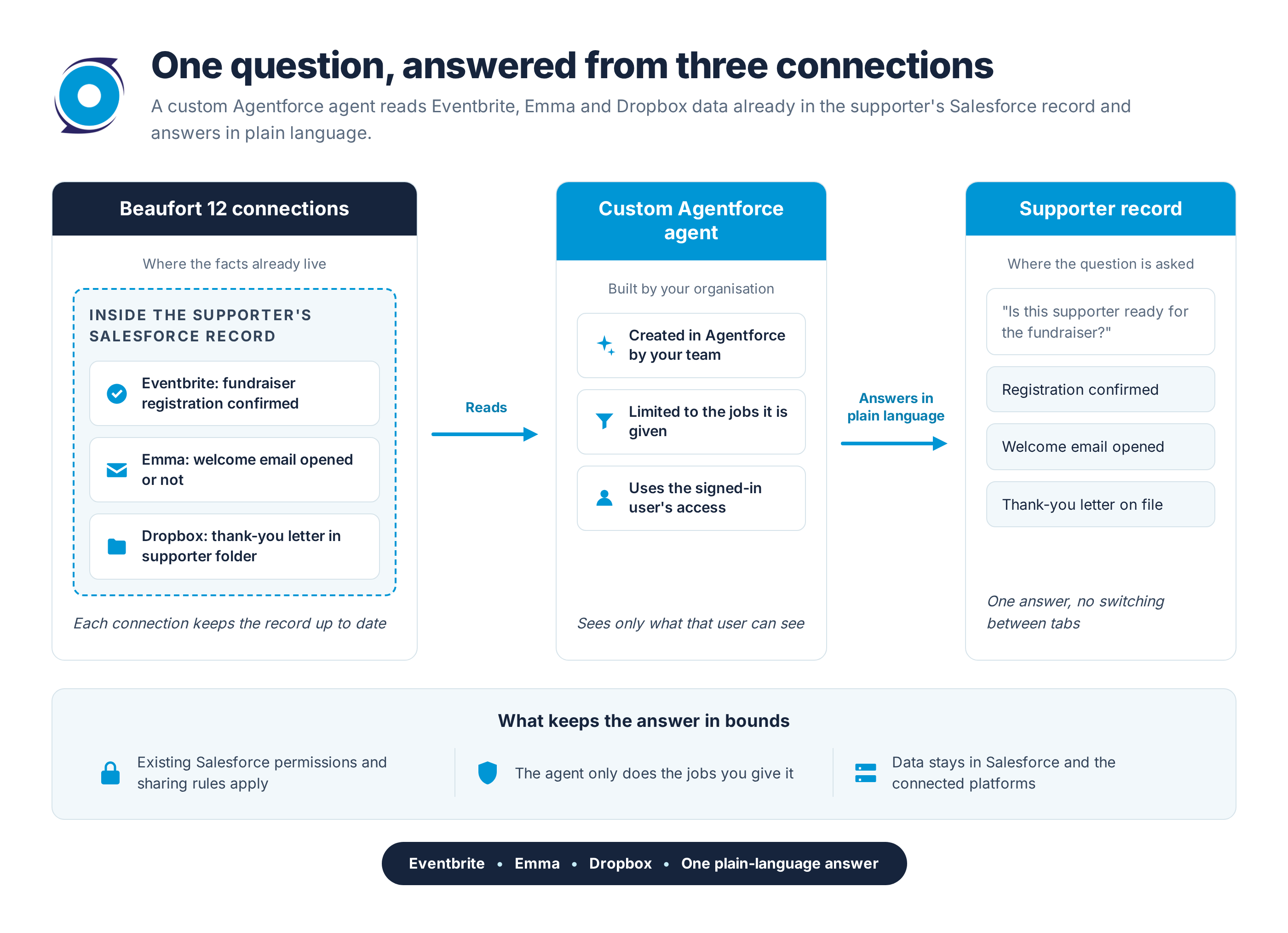
Here is the payoff. The coordinator types one question on Jordan's record: "Is Jordan registered for the fundraiser, what activity is recorded for the welcome email, and where is the thank-you letter?"
With the relevant actions configured, the agent can combine the registration status synced from Eventbrite, the available Emma engagement data and a link returned from the connected Dropbox folder. Some results use Salesforce records; others involve a live call to the connected service. The response should distinguish registration from attendance, explain missing data and identify the source or timeframe so the coordinator can verify it.
Compare the old route. Log into Eventbrite, search for Jordan. Log into Emma, search again, open the campaign report. Open Dropbox, hunt through folders. Then type a note. Four tools, one supporter, ten minutes.
If the admin has given those jobs, the coordinator can follow up in the same conversation: "add Jordan to New supporters" or "share a link to the thank-you letter". If a job has not been given, the agent will not do it. Configure confirmation before changes, review the exact member, account and group, and check the result afterwards. The answer depends on the enabled actions, source data and permissions; instructions and testing remain essential.
Who sets up a custom Agentforce agent, and what do they decide?
The admin configures the agent. They make three decisions: which jobs it gets, the instructions describing when each job applies, and who in the organisation is allowed to use it. Each job from Emma, Eventbrite and Dropbox comes with a short description, but those descriptions are a starting point, not a substitute for instructions written in your own words for your own work. "When someone asks whether a supporter has heard from us, check their recent Emma activity" says more to the agent than a generic label ever will.
Testing is part of the setup, not an afterthought. Try realistic phrasing, including requests that should not trigger anything, and confirm the agent declines them. A coordinator asking "what time is it" should not receive a Dropbox link.
Start small. Beaufort 12's advice is a few jobs aimed at one kind of question, leaving out anything destructive, such as delete, until there is a clear need for it. Access depends on the agent, action permissions, record sharing and connected account. For the Emma setup, see the Emma Agentforce walkthrough and Emma permissions guide.
Not sure which jobs to give your first agent, or how to phrase the instructions? The Dropbox automation guide walks through the "search plus act" pattern and how to test with realistic requests before anyone relies on it.
Do you need an agent at all, or is the Flow enough?
Here is the honest case. If all you want is the automatic welcome when Jordan registers, keep the Flow and skip the agent entirely. The Flow already does that job well, and an agent would add setup without adding value. An agent is useful when people want to request information or a supported task conversationally. A Flow can also be launched by a user or called by an agent; choose the interaction that fits the work.
| Situation | Configured Flow | Employee agent |
|---|---|---|
| Automatic welcome when Jordan registers | Right tool | Not needed |
| Same steps for every new supporter, nobody asking | Suited to a defined automatic process | Usually unnecessary for these fixed steps |
| One-off question on a record ("has Jordan opened the welcome?") | Can retrieve and present data through a configured screen or action | Uses enabled actions to answer a question in plain language |
| Ad-hoc task someone would do by hand (add to a group, share a link) | Can run a defined task when a user or agent launches it | Interprets the request and invokes a supported action |
| Who it works as | Runs as configured | Logged-in user context, subject to action and connection permissions |
| Effort to get value | Admin configures the trigger, actions, permissions and tests | Admin chooses jobs, writes instructions, tests |
In practice the two sit side by side: the Flow for the repeatable welcome, and a small agent for the questions. Choosing that mix does not mean two different integrations. The Dropbox jobs, for instance, are the same set whether a Flow runs them or an agent does, so you can reuse supported actions. The Flow and agent still need their own configuration, permissions and tests.
Sceptical? Fair questions about a custom Agentforce agent
Will it email our whole list by accident?
The member-lookup and group-management actions described here do not directly send a campaign. However, consider any downstream Emma automation before changing membership: email behaviour depends on the configured workflow trigger, action and contact eligibility. Group membership alone does not guarantee that a welcome journey starts. Start with read-only actions, use test groups with no active automations, and require confirmation for changes. A group change must not override a person's subscription or consent choices.
Can it move or delete files on its own?
Only if the admin included those jobs, and Beaufort 12's advice is to leave delete out unless there is a clear need. An agent given only the find-and-link jobs can hand you a link to the thank-you letter but has no way to remove or move anything.
Can it see things I cannot see myself?
The employee-agent example runs in the logged-in Salesforce user's context. What an action can return also depends on its permissions, record sharing and the connected Emma, Eventbrite or Dropbox account. Your admin should test with a representative user, including records and folders that should be inaccessible. Do not assume this same context applies to every Agentforce agent type.
Do we have to build one big agent that does everything?
No, and it is better not to. A grand agent with every job attached is harder to test and less reliable at choosing the right job. Start with one or two jobs that solve a real nuisance, such as the "has Jordan heard from us" question, and grow from there.
- Pick one question your team asks most often.
- Give the agent only the jobs needed to answer it.
- Test with real phrasing, then add the next job once the first has earned trust.
See the Full Supporter Story for Nonprofits
Jordan's welcome never needed an agent: the Flow takes the registration, adds them to the Emma group and creates the Dropbox folder without anyone asking, and a small custom agent on top answers the questions a coordinator actually brings to the record a week later. You can see that configured sequence on the nonprofits page and picture your own supporter journey running on it. Start with one or two jobs, keep the Flow doing what it already does well, and let the agent earn its place.
