

 EVENTBRITE FOR SALESFORCE · GUIDE
Eventbrite for
Agentforce.
Bring your event context into the conversation.
Ask about events, attendees and orders, then preview a supported administration change before it happens.
Eventbrite for Agentforce adds packaged topics and actions to Salesforce Agentforce. Your administrator chooses the agent, its instructions and the capabilities available to your team.
Eventbrite for Salesforce supplies the product connection and Salesforce context.
Eventbrite for Agentforce provides the supported topics and actions.
A customer-owned employee agent, access and a tested set of instructions.
Choose your starting point
- In Salesforce: configure a dedicated employee agent or add the packaged topics to an existing suitable agent. This guide follows that route.
- In Slack: add a Slack channel to the employee agent after it works in Salesforce.
- In an AI app: Hosted MCP is a separate connection to the packaged actions; it does not run the employee agent’s instructions.
The Eventbrite Agentforce Starter ↗ includes prerequisite checks, a template and setup scripts. It is configuration you own, not a replacement for the installed packages. If Bitbucket asks for access, contact our team for access to the starter.
Before you start
Use this checklist with your Salesforce administrator before setting up the agent.
Need the base app first? Follow the Eventbrite setup guide. For the Agentforce package installation link and currently supported version, contact our team.
Using the starter scripts? Install Salesforce CLI with the Agent plugin, Python 3 and jq. Work in the root of your local starter copy. The read-only preflight checks the org and installed actions; fix every failure before continuing.
Setup walkthrough
Start with one test user and a small, known set of data. Expand a step for instructions and a check before moving on.
01Connect and check Eventbrite
Open Eventbrite in Salesforce and choose the intended connected organisation. Find a known event and check its synced attendee information.
- Confirm the organisation is connected and accessible to the test user.
- Check the event name and start date so duplicate event names can be distinguished.
- Compare one attendee and order in the app before asking the agent about them.
The test user can find the expected record and product data without using the agent.
02Install the add-on and enable Agentforce
Eventbrite for Salesforce is connected to at least one accessible organisation. The starter requires Eventbrite for Agentforce 1.0 Beta 8 or later.
- In Setup → Installed Packages, confirm Eventbrite for Salesforce and Eventbrite for Agentforce are present.
- In Setup → Einstein Setup, enable Einstein if required.
- In Setup → Agentforce Agents, enable Agentforce. Einstein alone is not sufficient.
If you need the supported installer, contact our team. Salesforce labels and availability can vary by release and licence.
Both packages are installed in the same org and Agentforce is enabled.
03Give the test user access
Assign Eventbrite Standard (eb4sf__Eventbrite_Standard) or Eventbrite Admin as appropriate, plus Eventbrite Agent Access (eb4sfext__Eventbrite_Agent_Access). Check package licensing where required and visibility of the intended Eventbrite organisations and Salesforce records.
This starter uses an Employee Agent, which runs as the logged-in user. Do not configure a default Agent User for this route. Access to the new agent is a separate step after it is published.
The user has base-app access, the extension permission and access to the test records.
04Choose and create your agent
Already have a suitable employee agent? Add the packaged Eventbrite topics through Add subagent → Browse AgentExchange or the Asset Library. You do not need a second agent or the creation script. Existing-agent instructions ↗
Want a dedicated agent? Use the starter route below. It creates the customer-owned configuration and aligns action inputs and outputs with your installed package.
Dedicated-agent starter: commands and expected result
Get a local copy of the starter repository ↗. Authenticate to the intended test org; replace my-org with your alias throughout.
sf org login web --alias my-org
./scripts/preflight.sh my-org
Fix the preflight failures, then generate and validate a local draft:
./scripts/create-eventbrite-agent.sh my-org \
  --name Example_Eventbrite_Agent \
  --label "Example Eventbrite Agent" \
  --company "Example Organisation" \
  --draft
Keep --draft on your first run. It creates and validates the local authoring bundle without publishing or activating the employee agent. The generated file is in force-app/main/default/aiAuthoringBundles/<ApiName>/.
You have added topics to your existing agent or created a validated local draft.
05Review instructions and boundaries
- Use exact names and dates. Resolve the event, organisation and person before answering; show actual matching rows, not invented counts.
- Snapshot first. Reads normally use synced Salesforce data. Request current Eventbrite data explicitly when a supported live action is needed.
- Preview administration changes. The preview makes no change. Applying it requires later explicit acceptance and the matching preview fingerprint. Changing the target or inputs requires a new preview.
- Preserve the action response. The starter presents the complete safe
userMessage; IDs, fingerprints and raw payloads stay internal. - Keep unsupported work out of scope. The starter does not buy tickets, register people, issue refunds, check people in, publish events, send emails or create arbitrary events. Cloning an exact accessible event is a separate supported preview-first operation.
Customising and preserving your starter
Adapt the company, label, welcome message and tone. Preserve packaged action targets, input/output schemas, employee-agent execution and the product’s confirmation rules.
sf agent validate authoring-bundle --json \
  --api-name Example_Eventbrite_Agent -o my-org
Do not regenerate over manual edits. The creation script overwrites the local template. Keep your customised bundle, validate it and follow the repository’s direct publish instructions. Package updates do not automatically rewrite your customer-owned agent.
Customisation guidance ↗The available actions match the team’s purpose and the starter’s safeguards remain intact.
06Preview, cancel and verify
Test an organisation list, a named event summary and an attendee list that includes actual people. Then preview linking a test event to a test Salesforce Campaign: cancel first, then explicitly confirm a fresh preview. Test refusals for refunds, check-ins and publishing.
Testing the draft and inspecting results
sf agent preview start --json --use-live-actions \
  --authoring-bundle Example_Eventbrite_Agent -o my-org
Inspect the action trace: confirm the intended packaged action ran, its inputs match the request and the returned result supports the answer. Check the underlying record or file separately. Do not treat a timeout as proof that no action occurred.
Read results match the source, cancelling makes no change and a confirmed test action produces a verified result.
07Publish, grant access and retest
Once your administrator has reviewed the tested configuration, publish and activate the intended version.
Starter publishing options
Remove --draft from the same creation command to publish and activate. Keep --no-activate if you want to publish an inactive version for review.
If you edited the generated bundle, use the repository’s direct validate/publish route instead of regenerating it. Keep the existing API name when intentionally creating a new version.
- Assign the generated <Agent API Name>_Access permission set and confirm Agent Access includes this agent. Keep Eventbrite Standard/Admin and Eventbrite Agent Access from step 3.
- Refresh the user’s session after permission changes. Open Agentforce in Salesforce and select the configured agent.
- Repeat a read-only test as an intended end user, not just as an administrator.
- Give colleagues a few precise sample prompts and a route to their Salesforce administrator if results are missing.
The intended users can select the active agent and get the expected results with their own access.
What the agent can do
Your installed package version, configured actions and user access determine which requests are available.
Events and attendees
List accessible organisations, events, attendees and orders using exact names and dates.
Performance and context
Review summaries, registration funnels, person history and observed Salesforce associations.
Previewed administration
Refresh an event, clone a named event, add a custom question, copy question mappings or link a Salesforce Campaign when supported.
Interactive examples
Work through a read-only question, a useful follow-up and a confirmed change. These examples teach the sequence; they do not connect to your org.
Read an event summary
Before you try it: A named event synced from an accessible Eventbrite organisation.
Name the event and date
Check a grounded summary
Northstar Customer Workshop (Demo)
12 December 2026 · 40 registrations.
The real response should identify its data source and freshness. Registrations are not proof of attendance.
Verify the event
Open the matching Salesforce event. Compare the organisation, date and registration figures. If you explicitly need current Eventbrite data, request a supported live read.
Cancelled — no change made
The example stops at the preview. In your org, verify the target record or file if you are unsure whether an action ran.
Find the attendee rows
Before you try it: A known event with accessible attendee data.
Specify what to list
Expect people, not just a count
1. Sam Taylor (Demo) — attending
2. Alex Morgan (Demo) — attending
The result should show real returned rows in your org. “Attending” is a registration status; it does not establish that someone has checked in.
Check orders separately
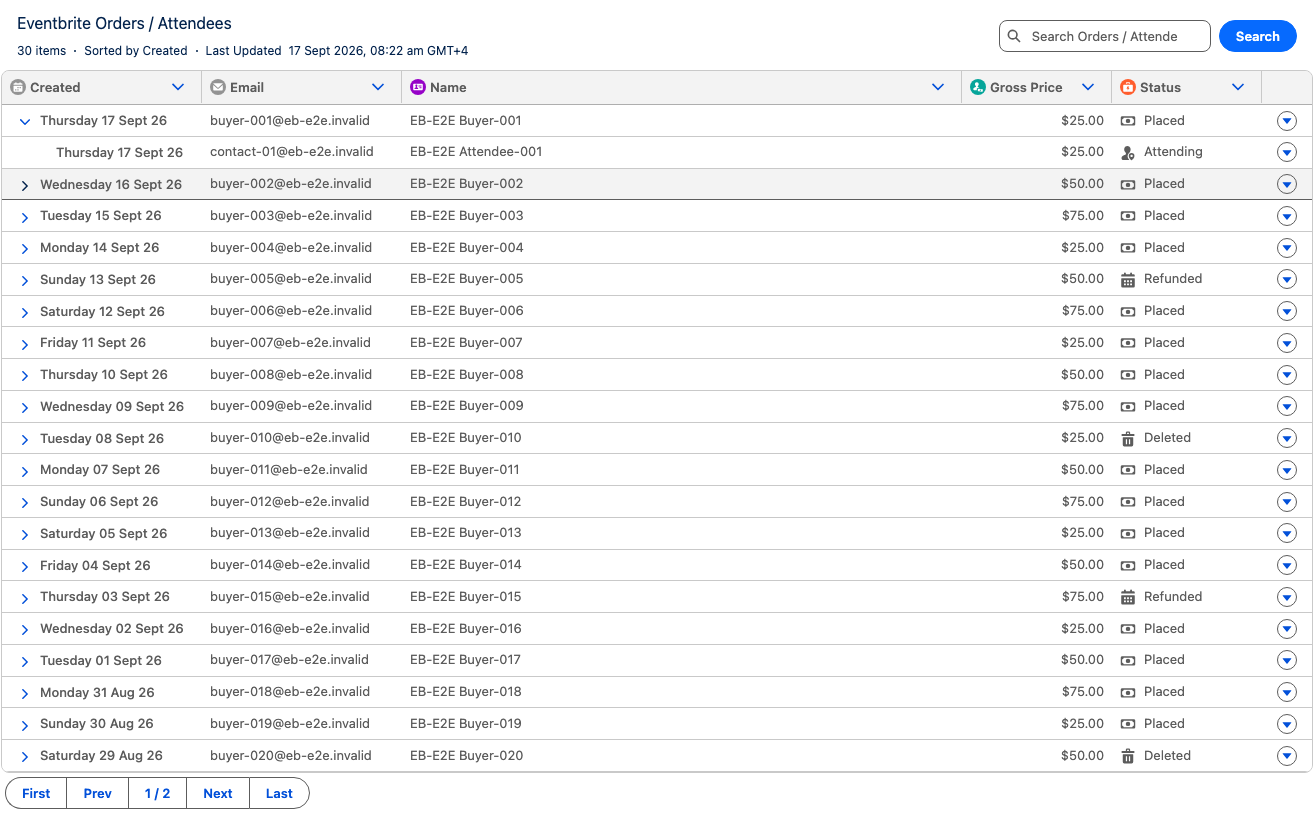
Compare the event’s Orders / Attendees view. One order may contain several attendees, so attendee totals and order totals can differ. Reading an existing refund or check-in status does not authorise changing it.
Cancelled — no change made
The example stops at the preview. In your org, verify the target record or file if you are unsure whether an action ran.
Link a test event to a Salesforce Campaign
Before you try it: An accessible test event and a separate test Salesforce Campaign.
Request one exact link
Review before applying
Link Northstar Customer Workshop (Demo) to Northstar Workshop Follow-up (Demo)?
The preview changes nothing. Review any existing link and the returned consequences before confirming.
These buttons only change the illustration. They do not update your connected systems.
Check the returned result
The actual action validates the matching preview fingerprint. If the event or Campaign changes, a fresh preview and acceptance are needed.
Verify the relationship
Open the event in Salesforce and inspect its Campaign association. Check the intended Campaign and any configured mapping behaviour. Do not treat a successful link as evidence that an email was sent or an attendee was checked in.
Cancelled — no change made
The example stops at the preview. In your org, verify the target record or file if you are unsure whether an action ran.
Illustrative responses, not live product output. Exact wording and available results depend on the installed actions and your configuration.
See it in Salesforce
Open an image to inspect the product view at full size. Use the examples above to practise the conversation separately.
Troubleshooting
| What you see | What to check |
|---|---|
| Preflight fails or topics are missing | Check the org alias, CLI Agent plugin, Python 3, jq and installed package versions. Fix the reported failures rather than assuming a fixed action count. |
| The agent is missing from the Salesforce panel | A local draft is not active. Check the published version, activation and the user’s generated Agent Access permission set. Refresh the session. |
| A user cannot find known data | Check their package licence where required, product permissions, extension permission and record access. Check the intended client/organisation and the last successful sync. |
| The answer does not match the source | Confirm the exact record, file or event and the action that ran. Compare the same date range and synced/live source. |
| A requested change is blocked | Review the exact preview and confirmation, permissions and supported operation. A changed target needs a new preview where applicable. Do not bypass the confirmation rules. |
| A request times out or gives no clear outcome | Inspect the source record or file before retrying. Do not assume a timeout means nothing happened. |
| Validation reports a property or schema error | A hand-pasted template can differ from your installed package. Preserve manual edits, then use the starter’s alignment process and validate again. |
Still stuck? contact our team with package versions, the failed step, error text and whether one user or everyone is affected. Leave out passwords, OAuth tokens and other credentials.
Common questions
Do I need to create another agent?
Does --draft publish the employee agent?
Can I use this in Slack?
Can I use an AI app through MCP?
Will a package update overwrite my agent?
Can it check attendees in or issue refunds?
Does “live event” mean live Eventbrite data?
Can it create or publish events?
Event management
Explore the related Eventbrite guide.
