Who this article is for: Salesforce admins, IT and security reviewers, and procurement teams evaluating or re-evaluating third-party integrations.
- You'll need: A basic understanding of how your org currently connects to outside tools (connected apps, External Client Apps, iPaaS connectors). No technical setup required.
- Time: 8-10 minutes to read
- At the end: You will be able to explain the difference between native and middleware integration models, see why externally stored OAuth tokens were the weak point in two recent incidents, and take a ready-made list of questions into any vendor review.
When you connect an outside tool to your org, who holds a credential that can log in, and where does that credential live? Most of Salesforce integration security comes back to that one question. There are two broad answers. Middleware and iPaaS tools sit outside Salesforce and log in with an OAuth token stored on their own infrastructure. Native managed packages run inside the org on the Salesforce platform and never log in from outside at all. Both models are legitimate and widely used. This article makes the trade-off visible, using Salesforce's own platform direction and two documented 2025 incidents as evidence, and leaves you with a checklist you can put to any vendor.
Why is Salesforce tightening how outside systems log in?
Salesforce is hardening the front door because external logins are where integration risk concentrates. From the Spring '26 release, creation of new connected apps is disabled by default in all orgs, both through Setup and through the Metadata API. New integrations are expected to use External Client Apps (ECAs) instead.
Be precise about what has and has not changed here, because it matters in a review. Existing connected apps keep working. Connected apps that ship inside installed managed packages can still be installed. Nothing has been switched off. What Salesforce has done is make the newer, more auditable ECA model the default path for a new external integration, which gives admins tighter control over scopes and policies.
A second change is further along the road. Salesforce is retiring the OAuth 2.0 username-password flow for connected apps, with the release update enforcement currently scheduled for early 2027. Any integration that logs in with a stored username, password and security token will stop working once that enforcement lands.
Taken together, these are natural evolutions of the platform. Each one pushes integrations towards narrower, better-governed login methods. And each one makes the same implicit statement: a credential that can log in to your org from the outside deserves close scrutiny.
How do middleware and iPaaS tools connect to your Salesforce org?
The mechanics are straightforward. An external tool such as Zapier, Make or n8n asks an admin to authorise it via OAuth. Salesforce issues an access token and a refresh token, and the tool stores both on its own servers. From then on, whenever a workflow needs to read or write Salesforce data, the vendor's infrastructure uses that stored token to log in on your behalf.
Records pass through the vendor's servers in transit, and are often retained there for task history, retries and logs. So a copy of some of your Salesforce data now exists outside Salesforce, under the vendor's retention policy rather than yours.
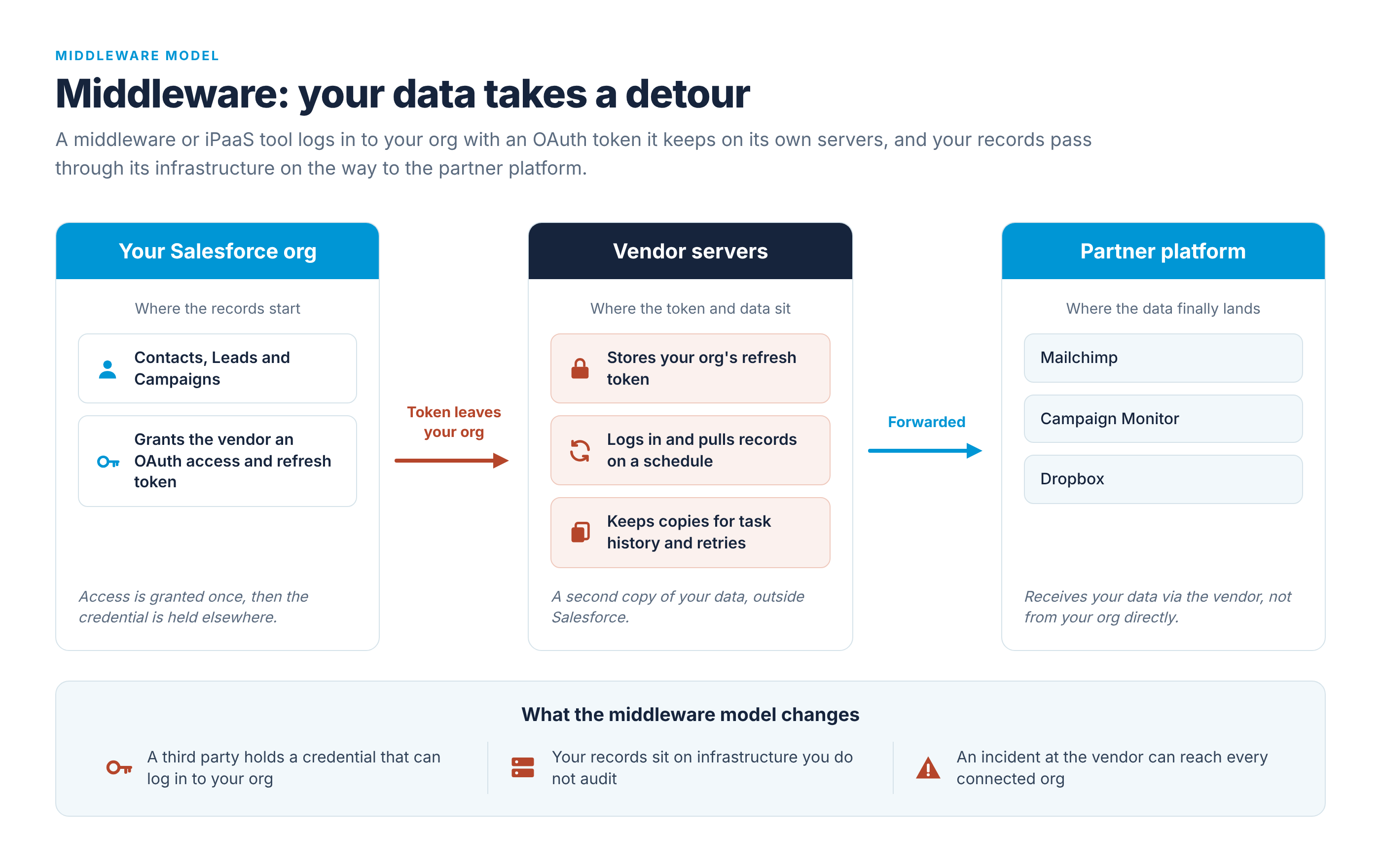
Zapier's own Salesforce admin documentation gives a concrete picture of what this looks like. It states that admins may need to create an External Client App for Zapier with the Full access (full) scope and refresh tokens enabled, and it advises against enabling refresh token rotation because Zapier keeps a single refresh token per connection. That is a description of how the product works, not a criticism of it.
This design is exactly what makes iPaaS tools so flexible: one connection model that works across hundreds of applications with no code. The trade-off is equally clear. A long-lived, broad-scope credential for your org now lives somewhere you do not control.
What do recent incidents tell us about externally held tokens?
Two incidents in 2025 show what happens when that externally held credential is compromised. Both are documented by Salesforce advisories, Google Threat Intelligence and reporting from BleepingComputer and The Hacker News. Both are summarised here strictly on the reported facts.
August 2025: Salesloft Drift
Attackers obtained OAuth access and refresh tokens associated with the Drift integration and used them to query data across hundreds of Salesforce orgs. In response, Salesforce and Salesloft revoked all Drift tokens, and the app was removed from AppExchange while the incident was investigated.
November 2025: Gainsight
Salesforce detected unusual activity involving apps published by Gainsight. It revoked all associated access and refresh tokens and temporarily removed the apps from AppExchange as a precaution.
The common thread is stated plainly in Salesforce's own communications: in neither case was there a vulnerability in the Salesforce platform. The weak point was a credential held by a third party, outside the customer's org, that could log in to Salesforce. That is a statement of where the risk sat, not a judgement on the vendors involved. Any organisation holding thousands of customer tokens is an attractive target, however carefully it operates.
The lesson follows naturally. The fewer long-lived credentials that exist outside your org, the smaller this whole category of risk becomes. It does not disappear, because partner platforms still issue tokens of their own. But the number of places a Salesforce login can be stolen from shrinks considerably.
How do native managed packages handle Salesforce integration security differently?
Beaufort 12's products take the other route. The Mailchimp to Salesforce integration, Campaign Monitor for Salesforce, Emma for Salesforce, Eventbrite for Salesforce and Dropbox for Salesforce are all managed packages installed into your org and configured in Salesforce Setup. All of the logic runs on the Salesforce platform. There is no middleware layer. Nothing outside Salesforce logs in to the org.
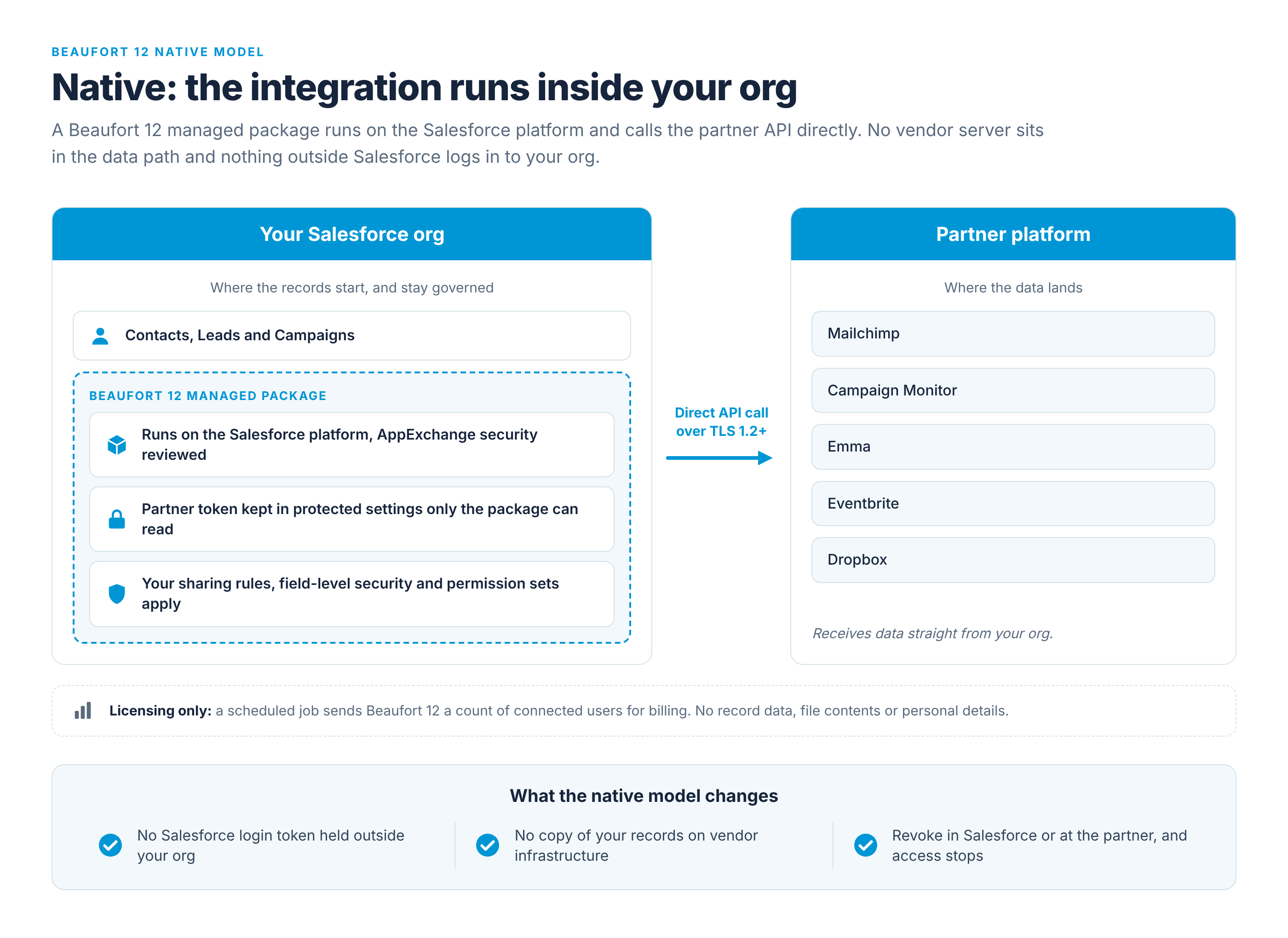
Tokens. Beaufort 12 holds zero Salesforce or partner tokens on its servers. Partner tokens do exist, because Mailchimp, Campaign Monitor, Emma, Eventbrite and Dropbox each issue credentials when you connect. Those credentials are stored inside your org in protected custom settings that only the package can read. They are not exposed through the standard object model, and they never leave Salesforce.
Data path. Records travel directly from Salesforce to the partner platform's API. No copy lands on Beaufort 12 infrastructure, so your existing data residency and retention arrangements with Salesforce and the partner apply unchanged.
Permissions. Your own sharing rules, field-level security and object permissions govern what the integration can touch. On first install, access is restricted to system administrators by default. You then extend it to other users through dedicated permission sets, and the custom objects each package creates obey standard Salesforce ownership and sharing.
Encryption. Every connection uses TLS. Salesforce requires TLS 1.2 or higher for outbound callouts, and the packages inherit that requirement.
Licensing telemetry. One call does go to Beaufort 12: a scheduled job reports the number of connected users to the licensing service twice a day, for billing. It sends a count. It never sends record data, file contents, user names or any personal details.
Worked example: revoking access in Dropbox for Salesforce
Dropbox for Salesforce shows how containment works in practice. Connections are per user, not per org. Each person authorises their own Dropbox account, and every API call runs under that person's own Dropbox permissions. The integration cannot widen those permissions, so a Salesforce administrator has no way to reach into a folder held in another user's Dropbox account. Users authenticate to Salesforce under whatever MFA policy your org enforces, and to Dropbox under Dropbox's own MFA settings. The package introduces no separate login of its own.
Revocation works from either end. Disconnecting inside Salesforce revokes the token with Dropbox and deletes the stored credential. Revoking the app from Dropbox account settings invalidates the connection immediately: the next token refresh fails, the stored credential is cleared, and the user is prompted to reconnect. The full detail is on the Dropbox for Salesforce security and compliance page.
None of this makes the integration immune to every threat, and this article does not claim it does. What the native model does is remove the externally stored Salesforce login token and reduce the attack surface to the boundaries you already manage.
What assurance can you take to a security review board?
Architecture is only part of a review. Reviewers also want evidence of process, and the Beaufort 12 Trust Centre collects it in one place.
AppExchange security review. All five packages, Mailchimp, Campaign Monitor, Emma, Eventbrite and Dropbox, have passed Salesforce's AppExchange security review and are re-reviewed as Salesforce requires. That is a review of the code and its handling of data, nothing more and nothing less.
Secure development. Every change is peer reviewed and scanned. Salesforce Code Analyzer runs on every build, Checkmarx runs on each release candidate, and dependencies are checked daily. A build with serious findings cannot ship.
Staged releases. Upgrades go to early adopters first, to sandboxes about a week later, and to all production orgs about a month after that. Customers can opt out of scheduled upgrades, which matters in change-controlled environments where every release needs a ticket.
Legal and contractual. A DPA is available. Beaufort 12 acts as a processor under GDPR, publishes its sub-processor list, runs its hosted services on AWS in Ireland, and maintains a responsible disclosure route for security researchers.
Transparency. A live status page shows current service health plus 90 days of public uptime and incident history, covering both Beaufort 12 services and the partner platforms the packages depend on.
Free security pack. On request, Beaufort 12 provides the DPA, a completed standard security questionnaire, AppExchange review details and a description of how data is stored. There is no charge for any of it.
Native vs middleware Salesforce integrations: side-by-side comparison
The table below puts the two models next to each other. It is deliberately honest about where middleware is the better tool.
| Criterion | Native managed package (Beaufort 12 model) | Middleware / iPaaS (Zapier, Make, n8n and similar) |
|---|---|---|
| Where the code runs | Inside your Salesforce org, on the platform | On the vendor's servers, outside Salesforce |
| Who holds a token that can log in to your org | Nobody outside the org | Vendor stores access and refresh tokens |
| Typical OAuth scope | Installing user's permissions plus dedicated permission sets | Often broad; Zapier documents the Full access (full) scope |
| Does record data leave Salesforce for the vendor's servers | No, records go direct to the partner API | Yes, in transit and frequently stored |
| What revoking access looks like | Disconnect in Setup or at the partner; credential removed from the org | Revoke the ECA or connected app in Salesforce and delete the connection at the vendor |
| AppExchange security review | Required; all five Beaufort 12 packages have passed | Varies; many iPaaS tools are not AppExchange packages |
| Breadth of connectable apps | Five partner platforms, each covered in depth | Hundreds of applications, no code |
| Custom multi-step orchestration | Purpose-built for one partner platform each | Strong; branching logic across many systems |
| Impact when the vendor has an incident | No externally stored Salesforce credential to steal | A compromised vendor token can reach every connected org |
The honest conclusion is that this is a choice between breadth and containment. If you need Salesforce to talk to a long tail of tools, or to run branching workflows across many systems, middleware is the right answer, and the question becomes how tightly to scope its token and how closely to monitor it. Where a native package exists for the platform you need, it removes a whole category of credential risk from the picture.
Checklist: questions to ask any Salesforce integration vendor
- Ask where the code runs: inside your Salesforce org, or on the vendor's servers. A good answer names the platform.
- Ask who holds a token that can log in to your org, with what OAuth scope, and how long-lived it is. The best answer is nobody outside the org.
- Ask whether record data leaves Salesforce for the vendor's infrastructure, even temporarily, and if so how long it is stored.
- Ask whether the product has passed AppExchange security review and when it was last re-reviewed.
- Ask what happens when you revoke access, and whether you can do it from inside Salesforce.
- Ask whether live service status and public incident history are available.
- Ask whether a DPA, sub-processor list and completed security questionnaire are provided without charge.
- Ask how releases are tested and staged, and whether you can opt out of automatic upgrades.
Paste these straight into your questionnaire. The Beaufort 12 Trust Centre answers each of them in writing for the Mailchimp, Campaign Monitor, Emma, Eventbrite and Dropbox packages, so you can compare responses side by side with any other vendor you are assessing.
Review the Beaufort 12 Trust Centre
If you are evaluating or re-evaluating an integration, start by asking where the token lives. For Beaufort 12's Mailchimp, Campaign Monitor, Emma, Eventbrite and Dropbox packages the answer is simple: inside your org, under your permissions, with nothing logging in from outside. The Beaufort 12 Trust Centre sets out the architecture, release process, legal documents and live status in one place, and you can request the free security pack (DPA, completed questionnaire, AppExchange review details and data-storage description) from there for your review board.
