Who this guide is for: Marketing teams and Salesforce admins who have Mailchimp connected to Salesforce and want to use contact data for personalised email campaigns
The most frustrating gap in email marketing isn't the lack of data. It's being unable to use it. Your Salesforce org holds rich contact intelligence: renewal dates, product interests, deal stages, account tiers, behavioural signals. Mailchimp holds the campaign builder and delivery infrastructure. Field mappings bridge the two, turning static audience lists into dynamic, personalised emails from Salesforce that reference exactly what each contact cares about.
This guide shows you how to map custom Salesforce fields to Mailchimp merge tags, verify the data flows correctly, and use those merge tags to personalise subject lines, email body content, and conditional blocks.
How Salesforce Data Flows into Mailchimp Merge Tags
When you sync Salesforce contacts to Mailchimp, the integration creates audience members. Field mappings determine which Salesforce fields become available as merge tags in your Mailchimp templates.
Field mappings work bidirectionally. Salesforce to Mailchimp mappings push data for personalisation: Industry, Lead Source, custom fields like Renewal_Date__c. Mailchimp to Salesforce mappings pull subscriber status, email tracking history, and campaign engagement data back into Salesforce for reporting.
Salesforce to Mailchimp mappings update every time the Salesforce record is updated. They only update existing audience members. If a contact exists in Salesforce but not in the Mailchimp audience, the merge tag data will not appear until that contact is added to the audience first.
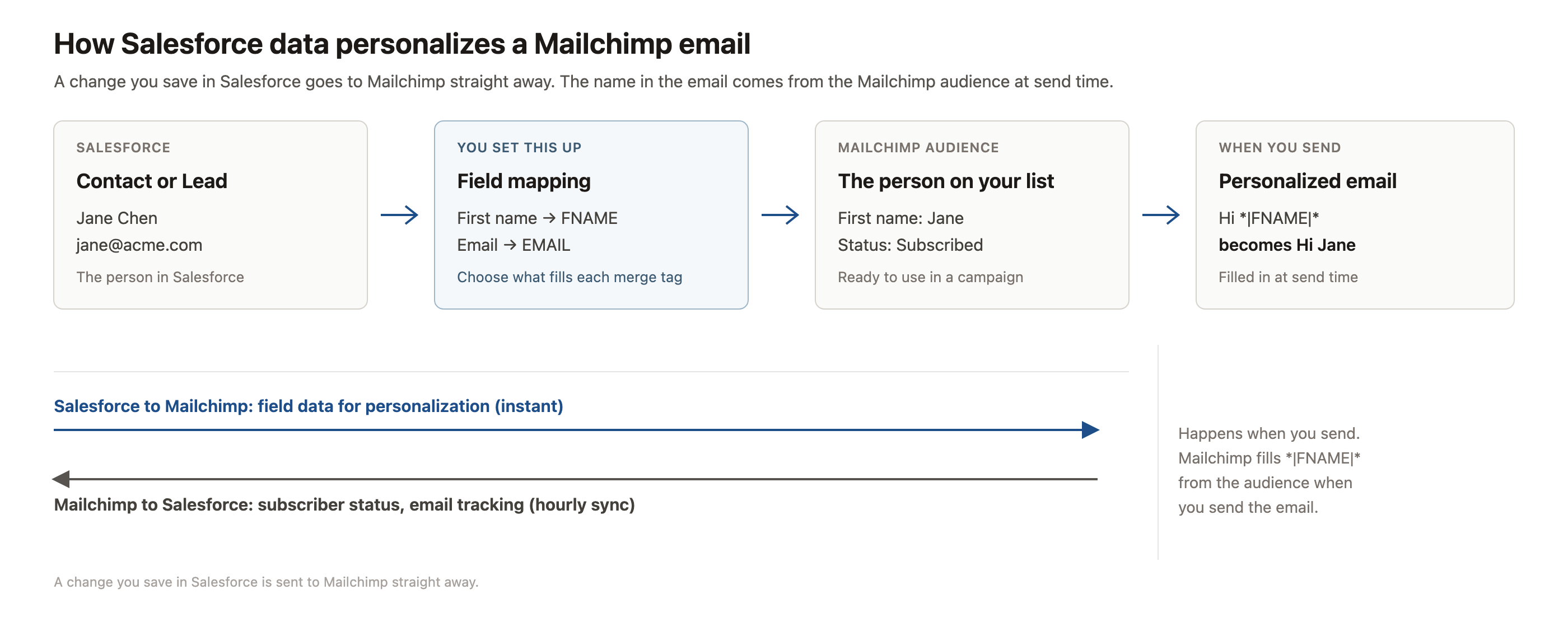
This separation matters. You cannot personalise an email with data from a contact who is not yet an audience member. The workflow is always: create the audience member, then map the fields, then the next sync populates the merge tags.
Step 1: Identify the Salesforce Fields You Want to Personalise With
Common personalisation fields include standard fields like Industry and LeadSource, account relationship fields like Account.Name, and custom fields like Renewal_Date__c or Event_Attendance__c. Choose fields that vary across your contacts and drive content decisions.
Step 2: Create Salesforce to Mailchimp Field Mappings
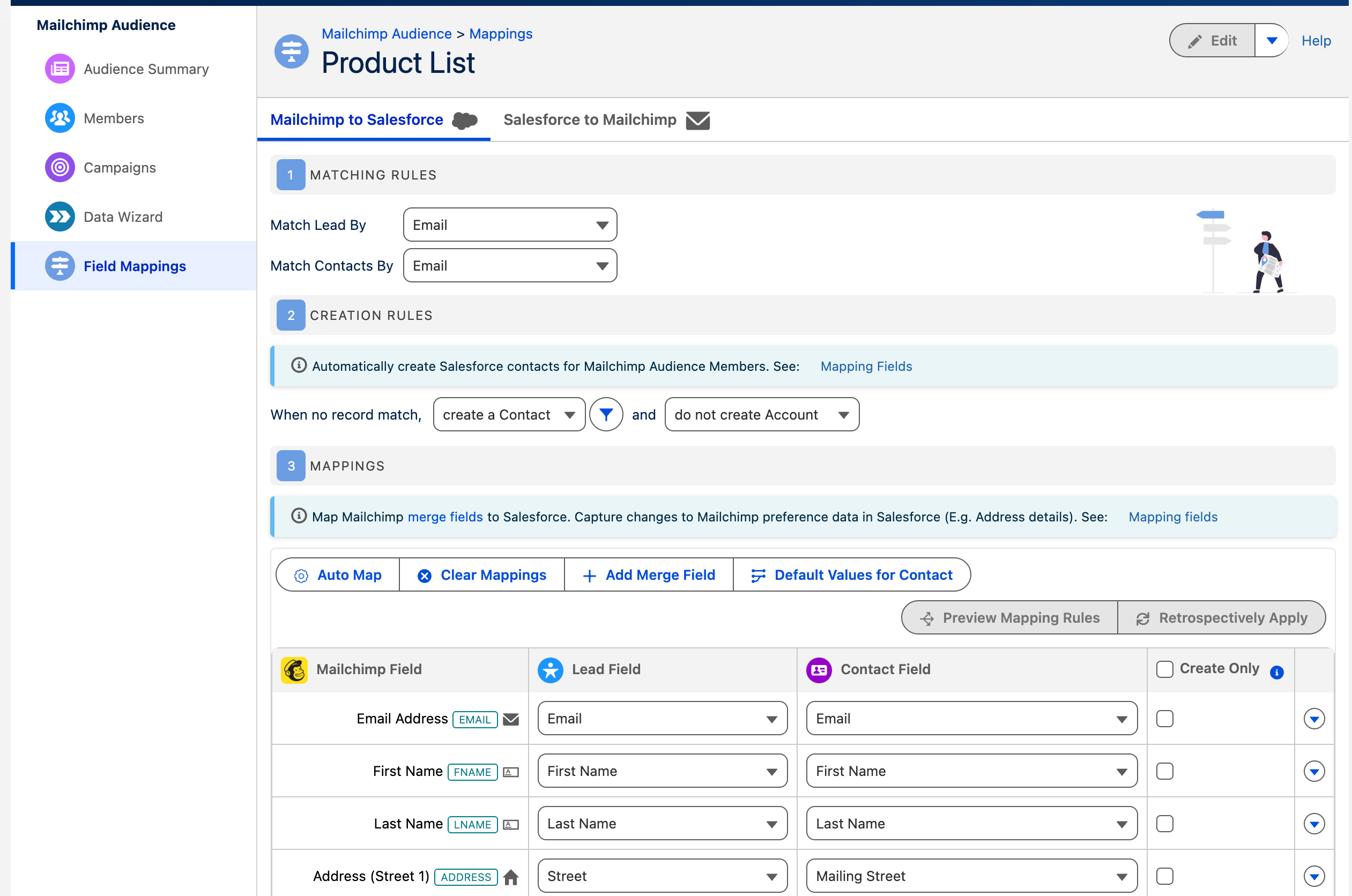
The mapping will take effect the next time the primary sync runs. You can trigger a manual sync or wait for the scheduled hourly sync to populate the merge tags in Mailchimp.
Need help deciding which fields to map for your campaigns? Send us your use case and we'll suggest a mapping strategy that fits your segmentation model.
Step 3: Verify Merge Tags Appear in Your Mailchimp Audience
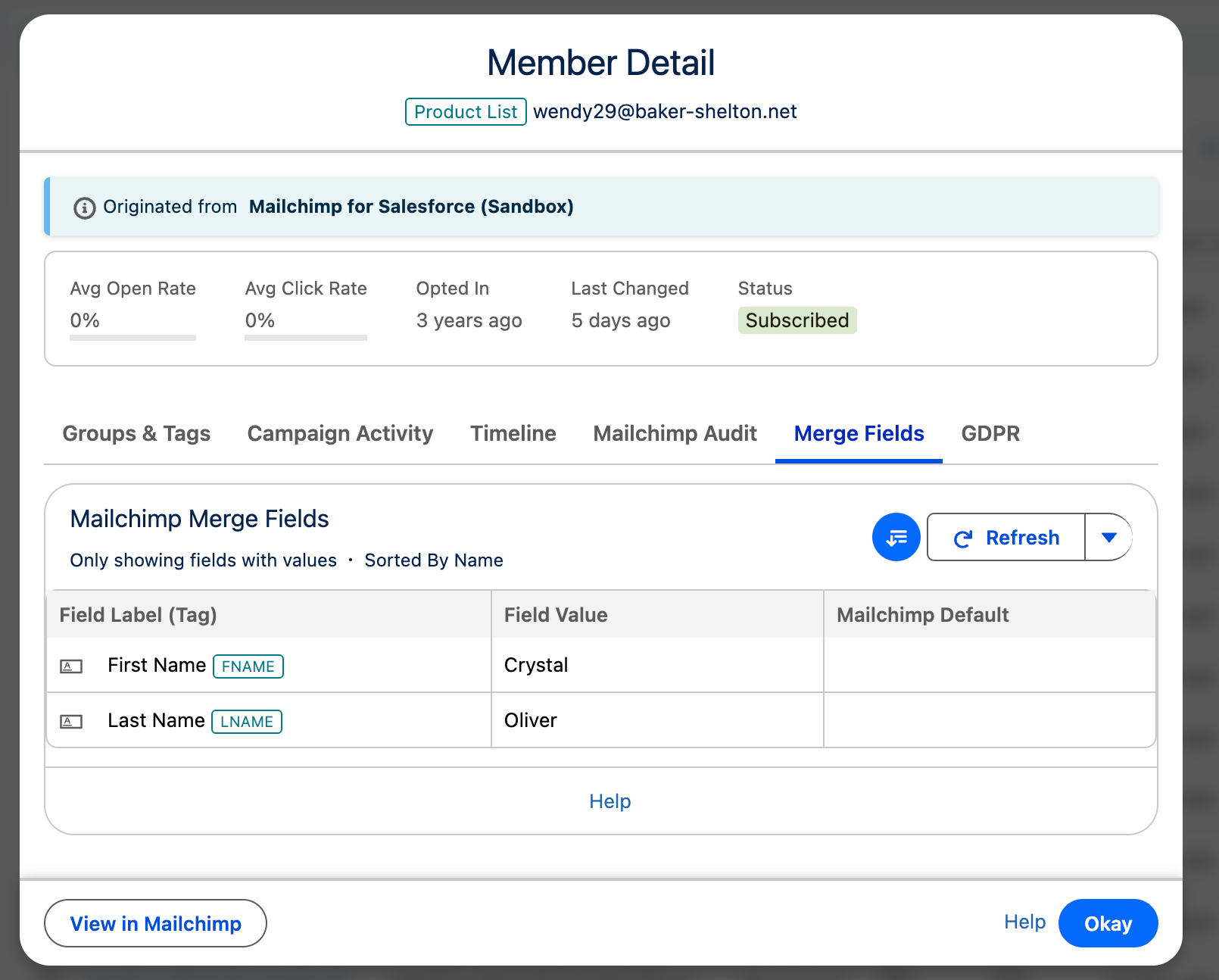
Merge tags are audience-specific. Each Mailchimp audience maintains its own set of merge fields. If you sync contacts to multiple audiences, you must create field mappings for each audience separately.
Step 4: Use Merge Tags in Your Mailchimp Campaign Template
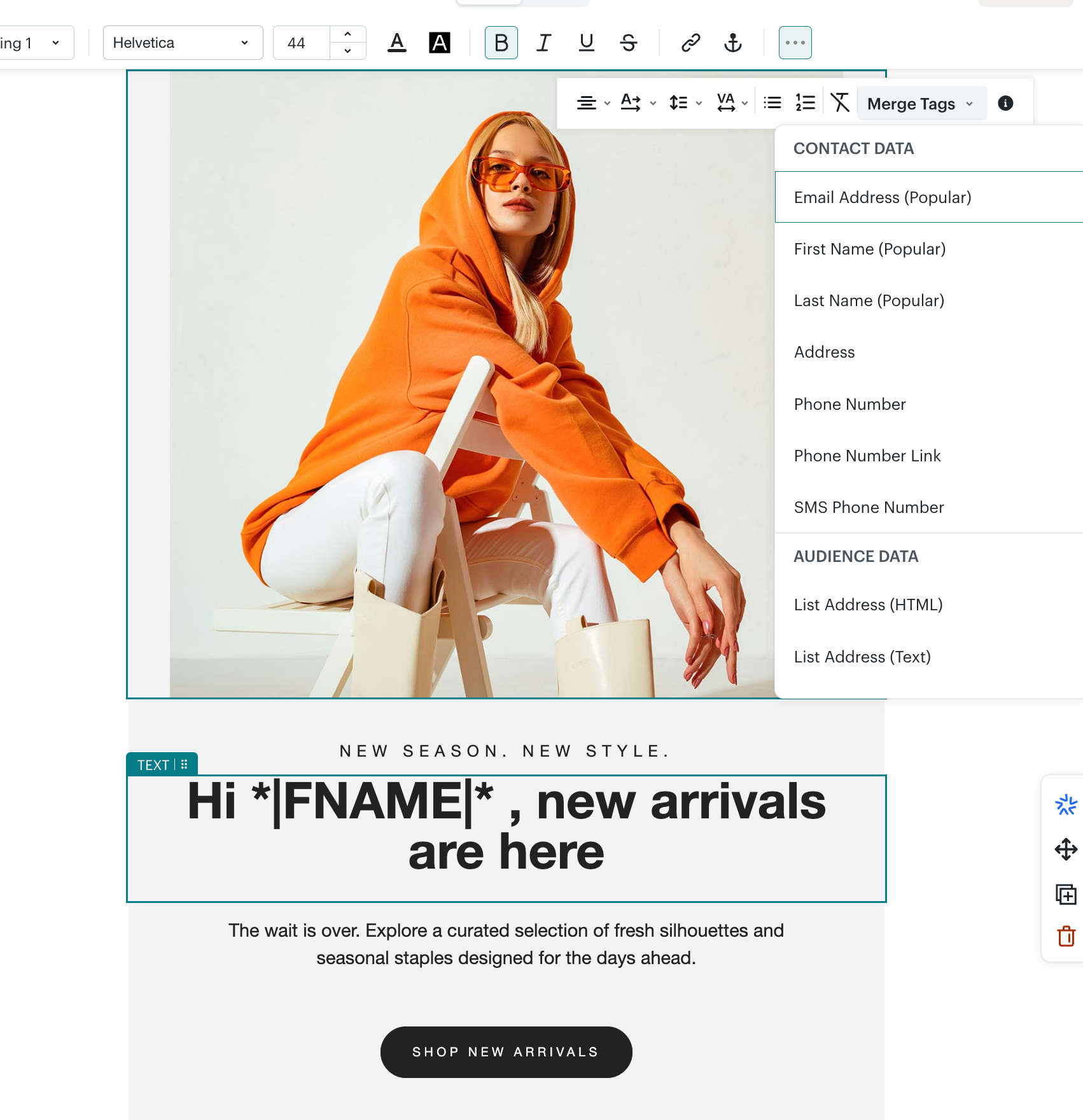
Merge tags update with the latest synced data each time you send a campaign. If a contact's Industry field changes in Salesforce, the next campaign sent after the sync runs will reflect the updated value.
Why the Sync Might Not Be Updating Merge Tag Data
Why is my merge tag showing empty values in Mailchimp?
Check that the Salesforce field contains data and that the sync has run since the data was entered. Salesforce to Mailchimp mappings only update during the scheduled sync, typically every hour.
Why isn't my new merge tag appearing in Mailchimp?
Verify the field mapping was saved with the correct direction (Salesforce to Mailchimp) and that at least one sync has completed since you created the mapping. New mappings do not take effect until the next sync runs.
Why are some contacts showing the merge tag but others aren't?
Salesforce to Mailchimp mappings only update existing audience members. If a contact was added to Mailchimp before the mapping was created, the next sync will populate the merge tag. Contacts not yet in the audience will not receive merge tag data until they are added as subscribers.
How often does merge tag data update in Mailchimp?
Data refreshes every time the primary sync runs, typically every hour. The sync only updates records that have changed in Salesforce since the last sync, so merge tag values reflect the most recent data at the time of the last sync.
Can I use Salesforce formula field values in merge tags?
Yes. As long as the formula field is visible to the integration user and you create a field mapping for it, formula field values sync to Mailchimp like any other field. This is useful for calculated fields like Days_Until_Renewal__c or Lifetime_Value_Tier__c.
Advanced Personalisation: Combining Merge Tags with Dynamic Tags and Segmentation
Merge tags handle static field data: the current value of a Salesforce field at the time of the last sync. For behavioural triggers and complex automation rules, Mailchimp's Dynamic Tags enable deeper personalisation. Dynamic Tags are created and assigned within Salesforce Flow, allowing you to tag contacts based on workflow logic, multi-field conditions, or event triggers.
Layer merge tags and segments for precision targeting. Use merge tags to personalise content within an email (e.g., "Your renewal on *|RENEWALDATE|* is approaching"), and use Mailchimp segments filtered by merge tag values to define the audience (e.g., only contacts where Renewal_Date__c is within 90 days). Combine this with Dynamic Tags to trigger campaigns when a contact moves into a specific lifecycle stage.
Common use cases: renewal campaigns that reference *|RENEWALDATE|* and target only contacts with upcoming renewals, event follow-ups that use *|EVENTNAME|* and *|ATTENDANCESTATUS|* to tailor messaging, regional offers that filter by *|ACCOUNTSTATE|* and personalise content with *|ACCOUNTNAME|*.
Each audience maintains independent merge fields and segments. Cross-audience personalisation requires separate field mappings for each audience. If you sync the same contact to multiple audiences (e.g., a "Newsletter" audience and a "Customer" audience), you must map fields to both audiences separately.
Get Started with Mailchimp for Salesforce
Mailchimp for Salesforce is the official integration endorsed by Intuit, replacing the free plugin that was retired in 2019. Pricing starts at $25/month based on active subscribers. You can install from AppExchange and start syncing in minutes.
